one of the things i actually don’t like about my htc phone is the fact that htc has decided to remove the option to disable automatic capitalization.
i haven’t found a direct way to turn auto caps off, but there’s a modification of their virtual keyboard that re-adds this feature:
- go to this article on xda-developers.com and download the version that fits your phone (“high res version” for the desire, “low res for android 1.5” for the hero)
- unzip the package. if you downloaded the file to your computer, transfer the .apk to your phone’s sd card.
- use your favourite android file manager to install. (i’m assuming you can also install through htc sync).
- you’re NOT done yet.
- open up the settings, language & keyboard, and allow “HTC_IME mod”.
- in a text input field (email, notes, sms, wherever), long press the field and choose “select input method”, there choose “HTC_IME mod”.
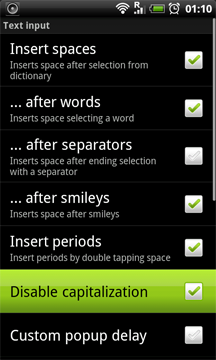
- if you now go to the keyboard settings (from your keyboard, or via settings), scroll down to the section “Mods by jonasl@xda”. “text input” will lead you to the long-sought option: “disable capitalization”.
this modified input method also adds a bunch of other options, such as: custom top level domains for the “.com” key (long press), a smiley key instead of “hide keyboard”, as well as speech-to-text (android 2.1 only).
you do not need root rights to install.
when i did all that it just says that it quit unexpectedly and i cant use it
unfortunately, this procedure doesn’t work with the latest version of swype anymore. they wrote something about having to completely revamp the user dictionary architecture…
or you can just install an alternative keyboard from google play which is offering those funktions (e.g. go keyboard, perfect keyboard free, etc.)
i am now using perfect keyboard free WITHOUT any automatic capitalization. i also disabled some other stuff :-)
works for me – hope i’ve helped